Appendix 5: Increase the security of your XOOPS installation
After installing XOOPS 2.7.0, take the following steps to harden the site. Each step is optional individually, but together they raise the baseline security of the install significantly.
1. Install and configure the Protector module
Section titled “1. Install and configure the Protector module”The bundled protector module is the XOOPS firewall. If you did not install it during the initial wizard, install it from the Admin → Modules screen now.
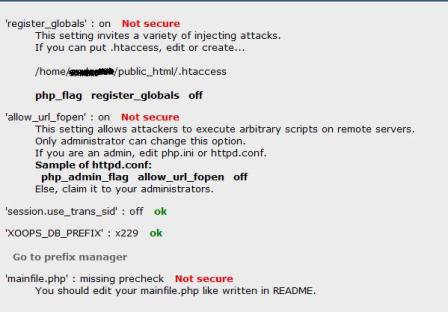
Open Protector’s admin panel and review the warnings it displays. Legacy PHP directives such as register_globals no longer exist (PHP 8.2+ has removed them), so you will not see those warnings anymore. Current warnings usually relate to directory permissions, session settings, and trust-path configuration.
2. Lock down mainfile.php and secure.php
Section titled “2. Lock down mainfile.php and secure.php”When the installer finishes it tries to mark both files as read-only, but some hosts revert the permissions. Verify and re-apply if needed:
mainfile.php→0444(owner, group, other read-only)xoops_data/data/secure.php→0444
mainfile.php defines the path constants (XOOPS_ROOT_PATH, XOOPS_PATH, XOOPS_VAR_PATH, XOOPS_URL, XOOPS_COOKIE_DOMAIN, XOOPS_COOKIE_DOMAIN_USE_PSL) and production flags. secure.php holds the database credentials:
- In 2.5.x, the database credentials used to live in
mainfile.php. They are now stored inxoops_data/data/secure.php, which is loaded bymainfile.phpat runtime. Keepingsecure.phpinsidexoops_data/— a directory you are encouraged to relocate outside the document root — makes it much harder for an attacker to reach the credentials over HTTP.
3. Move xoops_lib/ and xoops_data/ outside the document root
Section titled “3. Move xoops_lib/ and xoops_data/ outside the document root”If you have not already done so, move these two directories one level above your web root and rename them. Then update the corresponding constants in mainfile.php:
define('XOOPS_ROOT_PATH', '/home/you/www');define('XOOPS_PATH', '/home/you/zubra_mylib');define('XOOPS_VAR_PATH', '/home/you/zubra_mydata');define('XOOPS_TRUST_PATH', XOOPS_PATH);Placing these directories outside the document root prevents direct access to Composer’s vendor/ tree, cached templates, session files, uploaded data, and the database credentials in secure.php.
4. Cookie domain configuration
Section titled “4. Cookie domain configuration”XOOPS 2.7.0 introduces two cookie-domain constants in mainfile.php:
// Use the Public Suffix List (PSL) to derive the registrable domain.define('XOOPS_COOKIE_DOMAIN_USE_PSL', true);
// Explicit cookie domain; may be blank, the full host, or the registrable domain.define('XOOPS_COOKIE_DOMAIN', '');
Guidelines:
- Leave
XOOPS_COOKIE_DOMAINblank if you serve XOOPS from a single hostname or from an IP. - Use the full host (e.g.
www.example.com) to scope cookies to that hostname only. - Use the registrable domain (e.g.
example.com) when you want cookies shared acrosswww.example.com,blog.example.com, etc. XOOPS_COOKIE_DOMAIN_USE_PSL = truelets XOOPS correctly split compound TLDs (co.uk,com.au, …) instead of accidentally setting a cookie on the effective TLD.
5. Production flags in mainfile.php
Section titled “5. Production flags in mainfile.php”mainfile.dist.php ships with these two flags set to false for production:
define('XOOPS_DB_LEGACY_LOG', false); // disable legacy SQL usage loggingdefine('XOOPS_DEBUG', false); // disable debug noticesLeave them off on production. Enable them temporarily in a development or staging environment when you want to:
- hunt down lingering legacy database calls (
XOOPS_DB_LEGACY_LOG = true); - surface
E_USER_DEPRECATEDnotices and other debug output (XOOPS_DEBUG = true).
6. Delete the installer
Section titled “6. Delete the installer”After the install is complete:
- Delete any renamed
install_remove_*directory from the web root. - Delete any
install_cleanup_*.phpscript that the wizard created during cleanup. - Confirm the
install/directory is no longer reachable over HTTP.
Leaving a disabled but present installer directory is a low-severity but avoidable risk.
7. Keep XOOPS and modules up to date
Section titled “7. Keep XOOPS and modules up to date”XOOPS follows a regular patch cadence. Subscribe to the XoopsCore27 GitHub repository for release notifications, and update your site and any third-party modules whenever a new release ships. The security updates for 2.7.x are published via the repository’s Releases page.